AI & automation · Scheduling
Yoya lifetime deal: $49 once for AI scheduling
This Yoya lifetime deal review checks the AppSumo offer: AI booking by chat or voice, meeting briefs, and MCP booking. We checked the tiers, voice caps, calendar support, and the updates that matter before you buy.

Our take
The Yoya lifetime deal suits consultants, coaches, and sales hosts who want to qualify calls before they happen. The $49 Tier 1 covers 5 booking links and 100 bookings a month. Higher tiers add voice minutes, branding controls, and team scheduling.
- Starting price
- $49 once
- Best for
- Consultants, coaches, sales discovery calls
- Skip if
- You need Outlook or Microsoft 365 calendar sync today
- Refund window
- 60 days via AppSumo
The Yoya lifetime deal suits consultants, coaches, and sales hosts who want to qualify calls before they happen. The $49 Tier 1 covers 5 booking links and 100 bookings a month. Skip it if you need Outlook or Microsoft 365 calendar sync today.
What Yoya does
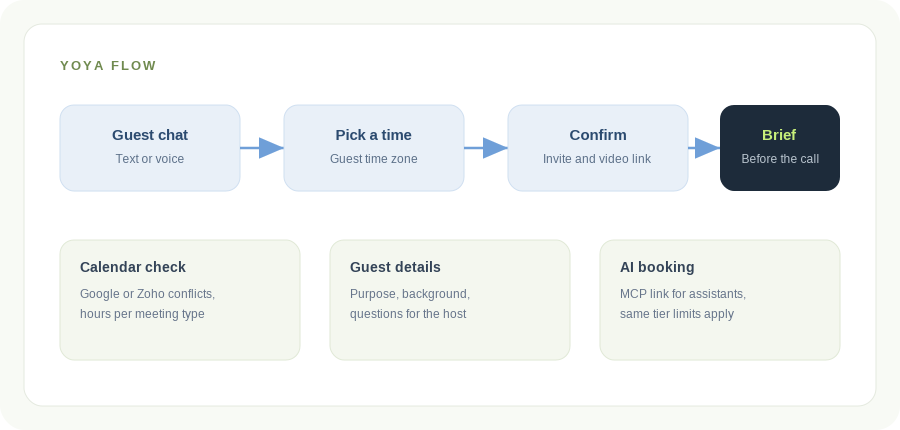
Yoya is an AI scheduling assistant. Instead of a plain booking form, guests chat with it by text or voice, pick a time, and confirm. Yoya then sends the host a brief with the guest's purpose, background, and questions. The Yoya lifetime deal on AppSumo starts at $49 once for Tier 1.
The company is a small bootstrapped startup from Finland, founded in 2025. The founder built it around a simple gap: a name and a time slot rarely tell you what someone wants from a call. Yoya tries to collect that information during booking, so the first minutes of the meeting go to the actual topic.
Features that matter
Booking by chat, voice, or classic form
Guests explain what they need in a text conversation, choose an available time, and confirm without creating an account. Voice booking is available within your tier's monthly minute allowance. A classic pick-a-time form is now live too, according to a founder update on November 12, 2026. You can let guests switch between calendar and chat, or keep one meeting type in classic mode.
Meeting briefs and guest details
Before each meeting, Yoya prepares a brief from the booking conversation. It covers the guest's purpose, background, and questions. On Tier 2 and above, it can add a LinkedIn profile summary when the guest shares their profile. Transcript history saves the booking conversation, not the meeting itself. Yoya does not record or transcribe the call.
Calendars, video links, and AI booking
Yoya checks Google Calendar for conflicts. A founder update on November 8, 2026 says Zoho Calendar support is live on every tier. It shows available times in the guest's time zone and sends calendar invites, email alerts, and reschedule or cancel links. You can create Google Meet or Zoom links with connected accounts.
Yoya has a public MCP connection too. Guests can hand your booking page to an MCP-compatible AI assistant, and the assistant can check availability and book. Hosts can connect their own assistant to manage meeting types, availability, and bookings. Your tier's limits still apply.
Yoya lifetime deal pricing and tier limits
The deal has three tiers. All are one-time payments with lifetime access and future updates to the included features. You must activate the license within 60 days. There is no code stacking. You pick one tier and can upgrade or downgrade between the three.
| Limit | Tier 1, $49 | Tier 2, $129 | Tier 3, $249 |
|---|---|---|---|
| Booking links | 5 | 10 | Unlimited |
| Bookings per month | 100 | 500 | Unlimited |
| Voice minutes per month | 60 | 180 | 400 |
| Transcript history | 30 days | Unlimited | Unlimited |
| LinkedIn profile summary, branding removal | No | Yes | Yes |
| Round robin, collective, payments | No | No | Yes |
Every tier includes text booking, meeting briefs, time zone detection, conflict checking, multiple meeting types, email alerts, reschedule and cancel links, AI assistant booking, and voice booking within the minute cap. Tier 2 and above add Google Meet and Zoom on the same link, LinkedIn summaries, unlimited transcript history, and Yoya branding removal. Tier 3 adds round robin and collective scheduling plus payments on the platform. A founder reply says Tier 3 includes a team of 3.
Yoya's own site lists Pro at $12 a month and Business at $29 a month. Compare the caps before you assume the lifetime tier is cheaper long term. The lifetime deal makes the most sense if you will use it for years and the tier limits fit your booking volume.
Who it fits and who should skip
A good fit
- Consultants and coaches who want to know what a client needs before the first call.
- Sales hosts who want to qualify leads during booking instead of after the call starts.
- Teams that need round robin or collective scheduling and can use Tier 3.
- People who already use AI assistants and want MCP booking for guests or themselves.
A poor fit
- Anyone who needs Outlook or Microsoft 365 calendar sync today. It has not shipped yet.
- Hosts who want a plain form only and no AI conversation at all.
- High-volume bookers who will pass the tier caps on links, bookings, or voice minutes.
- Agencies that need separate client accounts with their own calendars. That setup needs a custom arrangement.
Limits and checks before you buy
Voice minutes are capped each month
Tier 1 gives 60 voice minutes a month, Tier 2 gives 180, and Tier 3 gives 400. Text chat does not use voice minutes. If most guests will book by voice, do the math on your average call length and monthly volume before you pick a tier.
Outlook and Microsoft 365 are not live yet
The founder said on November 5, 2026 that Outlook and Microsoft 365 support had not shipped. Google Calendar and Zoho Calendar are the supported options. If your work calendar lives in Microsoft 365, wait or ask support for a current status before you buy.
A young company with thin public feedback
Yoya was founded in 2025 and has a small team. When we checked, the AppSumo listing had one review. That is less public feedback than older tools have. The 60-day refund window gives you time to test, but a lifetime deal still depends on the company staying around.
The chat flow may not suit every guest
Some guests prefer to pick a time and fill a form. The classic booking option helps, and you can let guests switch between calendar and chat. Test the flow with a few real guests during the refund window. If they resist the chat, keep classic mode on for those meeting types.
How we checked this deal
We read the live AppSumo listing, the founder's posts, the question threads, and the Yoya website on November 13, 2026. We checked the tier caps, the refund window, the activation rule, and the feature updates in the founder replies. We did not run a paid account or test the product hands-on. This review is a listing-based analysis. Our editorial policy explains the full process.
FAQ
Is the Yoya lifetime deal a one-time payment?
Yes. Tier 1 costs $49 once, Tier 2 costs $129 once, and Tier 3 costs $249 once. Each gives lifetime access to that tier with future updates to the included features. You must activate the license within 60 days of purchase.
Does Yoya record or transcribe the meeting itself?
No. The meeting brief summarizes what the guest shared during booking. Transcript history refers to that booking conversation. Yoya does not record or transcribe the actual meeting, so it is not a replacement for a meeting recorder or note taker.
Which calendars does Yoya support?
Yoya checks Google Calendar for conflicts. A founder update on November 8, 2026 says Zoho Calendar support is live on every tier. Outlook and Microsoft 365 support had not shipped as of the founder's November 5 update. Check with support for the current status.
Can guests book without chatting?
Yes. A classic pick-a-time form is live, according to a founder update on November 12, 2026. You can set a meeting type to classic mode, or let guests switch between calendar and chat. That gives guests who dislike chat a simpler path.
Verdict
The Yoya lifetime deal is a good fit if the main problem is walking into calls without knowing what the guest wants. The $49 Tier 1 is a fair entry price for solo hosts with modest booking volume. Tier 2 makes sense if you want branding removal and LinkedIn summaries. Tier 3 fits teams that need round robin scheduling and payments. Test the free plan on Yoya's site first, then buy through the link below if the caps fit.
Prices and terms were checked on November 13, 2026. AppSumo deals can change or end. Confirm the current price, tier caps, and refund terms on the live listing before you buy.